From Data to Answers: Create Your First RAG Setup
Because prompts alone aren't enough. Add context. Add power.
Because prompts alone aren't enough. Add context. Add power.

LLMs are impressive until they're not. Ask one about your codebase, your internal docs, or anything outside its training data and it'll confidently make something up. No disclaimer, no uncertainty, just a well-formatted wrong answer.
The fix isn't a better model. It's better context.
RAG, Retrieval-Augmented Generation, is the pattern that solves this. You pull the relevant information at query time and inject it into the prompt. The model stops guessing because it doesn't have to.
In this blog we'll break down how RAG actually works, build a pipeline from scratch, and cover the parts most tutorials skip, chunking tradeoffs, embedding choices, and where retrieval quietly fails.
Let's build.
LLMs don't retrieve facts. They predict tokens.
When you send a prompt, the model isn't looking anything up. It's doing one thing: predicting the most statistically likely next token based on everything it was trained on. That's it. There's no database query, no verification step, no source check.
So when you ask about something it doesn't have strong training signal for, it doesn't say "I don't know." Instead, it fills the gap with the most plausible-sounding continuation. That's hallucination. Not a glitch. Just the model doing exactly what it was built to do.
But missing information is only one piece of the puzzle. Here's what else is going on under the hood.
Think of an LLM as a highly compressed zip file of the internet. During training, billions of documents get squeezed down into a pattern of weights. Details get lost. The model might remember that "Paris has a famous tower" and "Eiffel Tower is in Europe" but forget exactly which city. When you ask, you're essentially decompressing that blurry reconstruction. Sometimes details come back crystal clear. Sometimes they blend together in ways that look right but aren't.
LLMs are brilliant at recognizing patterns. Maybe too brilliant. The model has seen thousands of historical figures with concise Wikipedia-style summaries: "Born in X, known for Y, died in Z." So when you ask about a historical figure that doesn't exist, say, "Edmund Blackwood, the 19th century philosopher", the model will happily generate a plausible biography. Birth year? 1812. Key work? "The Ethics of Doubt." Influence? Nietzsche. It recognized the pattern and filled in the gaps, never stopping to check if the person was real.
There's an inherent tension built into these models: they're trained to be helpful. If you ask "Tell me about the history of Llamaville" (a place that doesn't exist), the model faces a conflict. Refusing feels unhelpful. So it often chooses to generate something that sounds plausible rather than shut you down. It prioritizes being agreeable over being accurate.
Training is expensive and happens once. After that, the model is frozen. Anything that happened after that date simply doesn't exist to it. Ask about a library update from last month, a new API, or your internal documentation and you'll get either outdated info or a confident guess.
Even when the model does have the right information in its training data, there's another problem: how much of it can it actually use at once. With large contexts, like a whole book or a long conversation, the model literally loses focus. It drops details from earlier and fills gaps with plausible but wrong tokens just to complete the pattern.
This is why throwing a better prompt at the problem doesn't fix it. The model isn't confused. It's not misreading your question. It's doing exactly what it was designed to do: predict the most likely next token, whether those tokens happen to be true or not.
And this brings us to a related issue. Even when the model has the right information and wants to be helpful, it can only hold so much in its head at once. Which brings us to the next section: What Context Window Limitations Mean.
Every LLM has a context window, a hard limit on how many tokens it can process in a single request. This includes your system prompt, conversation history, any documents you stuff in, and the response itself. Once you hit that limit, the model either truncates or starts losing track of earlier content.
Modern models have gotten better. GPT-4o supports 128k tokens, Gemini goes even higher. Sounds like a lot until you try to feed it your entire codebase, a 50 page PDF, or a knowledge base with thousands of entries. Then it falls apart fast.
And even within the context window, more isn't always better. Research has shown that LLMs struggle to effectively use information buried in the middle of a long context. They tend to pay more attention to the beginning and end. So stuffing your entire document in and hoping for the best is not a strategy.
This is exactly where RAG comes in. Instead of dumping everything into the context, you retrieve only the relevant pieces and inject those. Smaller context, better accuracy, and you're not hitting token limits every other request.
RAG has two distinct pipelines. Most people conflate them and that's where confusion starts.
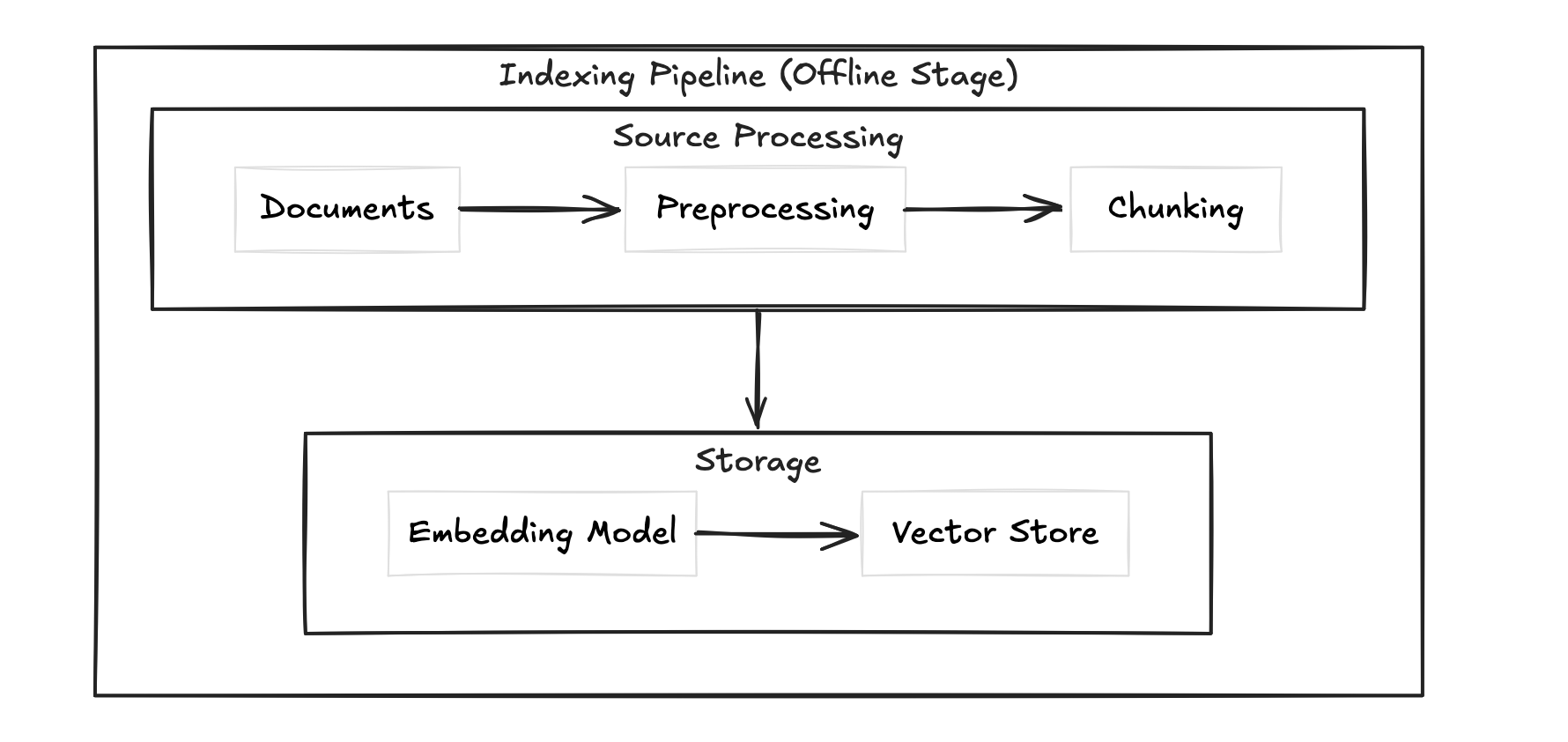
This is where you prepare your data. You take your documents, preprocess them (cleaning, parsing PDFs, handling tables), chunk them into smaller pieces, convert those chunks into embeddings, and store them in a vector database alongside any metadata like source, date, or author. This pipeline runs before any user query hits your system.
This is what runs every time a user asks something. You take the query, convert it into an embedding using the same model, search the vector store for the most similar chunks, and inject those chunks into the prompt alongside the query.
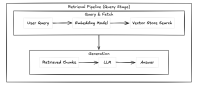
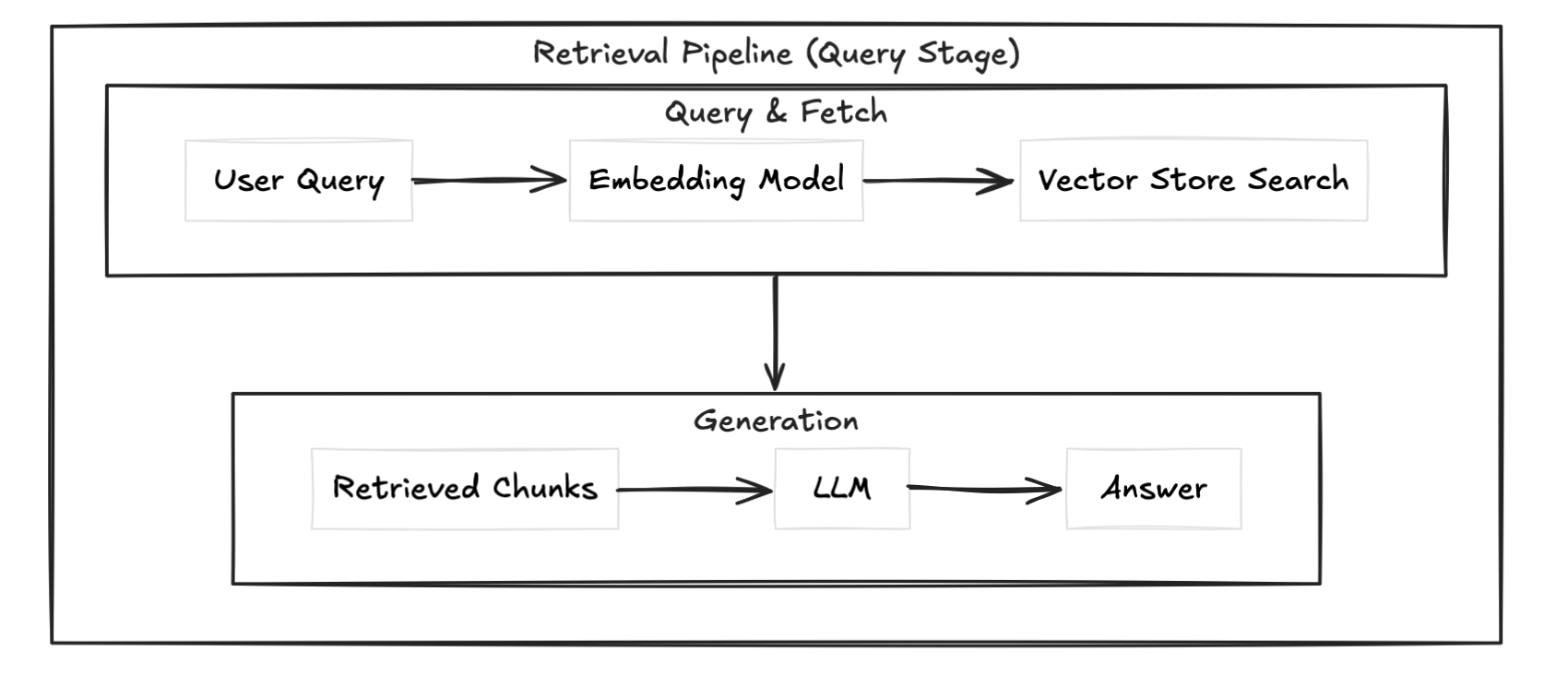
The separation matters. If your retrieval is slow, that's a vector store or search problem. If your answers are bad despite good retrieval, that's a chunking or prompt problem. Knowing which pipeline is broken saves you a lot of debugging time.
The two pipelines above get you a working RAG system. But production systems usually layer on top of these. Re-ranking runs a second pass on retrieved chunks to reorder by actual relevance. Hybrid search combines vector similarity with keyword search for better coverage. Query rewriting transforms the user query before embedding it to improve retrieval quality. And an evaluation layer lets you measure whether any of it is actually working.
We won't go deep on these here, but know they exist and you'll likely need them once your basic setup starts showing cracks.
Chunking is how you split your documents before embedding them. It sounds simple but it's one of the biggest levers in your RAG pipeline. Bad chunking means bad retrieval, and bad retrieval means bad answers regardless of how good your model is.
The simplest approach. You split your document every N characters or tokens regardless of content structure.
def chunk_text(text, chunk_size=500, overlap=50):
    chunks = []
    start = 0
    while start < len(text):
        end = start + chunk_size
        chunks.append(text[start:end])
        start = end - overlap
    return chunks
Fast and predictable but dumb. It'll cut sentences, split code blocks, and break context mid-thought. The overlap parameter helps but doesn't fully fix the problem.
Think of it like a priority list for where to split.
First it tries to split on double newlines (paragraph breaks). If the resulting chunk is still too big, it tries single newlines. Still too big? It tries periods. Then spaces. Then individual characters as a last resort.
So instead of blindly cutting every 500 characters, it's always trying to find the most natural breaking point first. A paragraph break is better than mid-sentence. Mid-sentence is better than mid-word.
separators=["\n\n", "\n", ".", " ", ""]
This list is the priority order. It works left to right, only moving to the next separator if the chunk is still oversized.
from langchain.text_splitter import RecursiveCharacterTextSplitter

splitter = RecursiveCharacterTextSplitter(
    chunk_size=500,
    chunk_overlap=50,
    separators=["\n\n", "\n", ".", " ", ""]
)
chunks = splitter.split_text(text)
This is the go-to for most use cases. Respects document structure without requiring you to know anything about the content upfront.
The most sophisticated approach. Instead of splitting by size or structure, you split by meaning. You embed sentences, measure similarity between adjacent ones, and split where similarity drops.
Better retrieval quality but slower and more expensive since you're embedding during the indexing phase itself.
Overlap means you repeat a small portion of the previous chunk at the start of the next one. This prevents context from being lost at chunk boundaries. Too little overlap and you lose context. Too much and you're storing redundant information and inflating your vector store.
A 10-15% overlap relative to chunk size is a reasonable starting point.
Recursive chunking for most cases. Fixed-size if you need speed and simplicity. Semantic chunking if retrieval quality is critical and you can afford the extra compute.
An embedding is a numerical representation of text. Specifically a vector, an ordered list of floating point numbers. The whole point is that semantically similar text produces vectors that are close together in high dimensional space.
"I love dogs" -> [0.23, -0.11, 0.87, 0.04, ...]  # 1536 numbers for OpenAI ada-002
"I adore dogs" -> [0.24, -0.09, 0.85, 0.03, ...]  # very close
"stock market crash" -> [-0.67, 0.43, -0.12, 0.91, ...] # far awayThis didn't come out of nowhere. The foundation goes back to a linguistics theory from 1957 called the distributional hypothesis, proposed by John Rupert Firth:
"You shall know a word by the company it keeps"
The idea is simple. Words that appear in similar contexts have similar meanings. "Dog" and "cat" both appear near words like "pet", "feed", "walk". So they should be close in vector space.
In 2013, Tomas Mikolov and his team at Google operationalized this with Word2Vec. They trained a neural network to predict surrounding words given a center word. To do that well, the network had to learn that similar words appear in similar contexts. The vectors that emerged captured semantic relationships nobody explicitly programmed in.
The famous example:
king - man + woman ≈ queenThe model was never taught this. It just fell out of the training. That was the moment people realized dense vector representations were something serious.
Word2Vec had one problem though. Every word got a single fixed vector regardless of context. "Bank" in "river bank" and "bank" in "investment bank" got the same vector.
BERT in 2018 fixed this with contextual embeddings. The vector for a word now changed based on surrounding text. That's the foundation modern embedding models are built on.
Under the hood, embedding models are transformer neural networks. When you pass text through one, here is what happens:
The model is trained to pull similar meanings together and push different meanings apart in this vector space. That training is what makes the embeddings useful.
Once you have vectors, you need a way to measure how similar two vectors are. The standard approach is cosine similarity.
First, the dot product of two vectors A and B:
A · B = Σ(Ai × Bi) = A₁×B₁ + A₂×B₂ + ... + Aₙ×BₙThis measures how much two vectors point in the same direction. But it's sensitive to magnitude, longer vectors produce larger dot products even if the angle between them is the same.
The magnitude (length) of a vector:
||A|| = √(A₁² + A₂² + ... + Aₙ²)Normalize the dot product by both magnitudes and you get cosine similarity:
cosine_similarity(A, B) = (A · B) / (||A|| × ||B||)This gives you a value between -1 and 1. Two identical vectors score 1. Completely unrelated vectors score close to 0. Opposite vectors score -1.
In RAG, when a user query comes in, you embed it and find the chunks whose vectors have the highest cosine similarity to the query vector. Those are your retrieved chunks.
import numpy as np

def cosine_similarity(a, b):
    dot_product = np.dot(a, b)
    magnitude = np.linalg.norm(a) * np.linalg.norm(b)
return dot_product / magnitudeModel | Dimensions | Best for
-------------------------------|------------|--------------------------
OpenAI text-embedding-ada-002 | 1536 | General use, easy setup
OpenAI text-embedding-3-small | 1536 | Cheaper, still solid
sentence-transformers/all- | 384 | Local, fast, free
MiniLM-L6-v2 | |
BAAI/bge-large-en | 1024 | Open source, high qualityOpenAI if you want plug and play. sentence-transformers if you want to run locally and keep costs down.
A vector database is optimized for one thing: storing vectors and finding the nearest ones fast. Regular databases can not do this efficiently at scale.
Database    | Best for
-----------|------------------------------------------
FAISS      | Local, no infra, fast prototyping
ChromaDB   | Local with persistence, easy setup
Pinecone   | Production, managed, scales well
Weaviate   | Production, open source, hybrid search support
For prototyping use ChromaDB. For production use Pinecone or Weaviate.
import chromadb
from chromadb.utils import embedding_functions

client = chromadb.Client()
openai_ef = embedding_functions.OpenAIEmbeddingFunction(
    api_key="your-api-key",
    model_name="text-embedding-ada-002"
)

collection = client.create_collection(
    name="my_rag",
    embedding_function=openai_ef
)

collection.add(
    documents=["chunk 1 text", "chunk 2 text"],
    ids=["id1", "id2"]
)

results = collection.query(
    query_texts=["user query here"],
    n_results=3
)We'll build a RAG system that loads the Super Bowl Wikipedia page, chunks it, embeds it into ChromaDB, and answers questions against it using OpenAI.
pip install langchain langchain-openai langchain-chroma chromadb beautifulsoup4from langchain_community.document_loaders import WebBaseLoader
loader = WebBaseLoader("https://en.wikipedia.org/wiki/Super_Bowl")
documents = loader.load()WebBaseLoader fetches the page and returns a list of Document objects. Each document has a page_content field with the raw text and a metadata field with the source URL.
from langchain.text_splitter import RecursiveCharacterTextSplitter

splitter = RecursiveCharacterTextSplitter(
    chunk_size=500,
    chunk_overlap=75
)

chunks = splitter.split_documents(documents)
print(f"Total chunks: {len(chunks)}")
We're using RecursiveCharacterTextSplitter here, the same one we covered earlier. 500 token chunks with 75 token overlap, roughly 15%.
from langchain_openai import OpenAIEmbeddings
from langchain_chroma import Chroma
import os
from dotenv import load_dotenv

load_dotenv()

embeddings = OpenAIEmbeddings(
    model="text-embedding-ada-002",
    api_key=os.getenv("OPENAI_API_KEY")
)

vector_store = Chroma.from_documents(
    documents=chunks,
    embedding=embeddings,
    persist_directory="./chroma_db"
)
Chroma.from_documents handles everything. It embeds each chunk using the embedding model and stores both the vector and the original text. persist_directory saves it to disk so you don't re-embed every time you restart.
retriever = vector_store.as_retriever(
    search_type="similarity",
    search_kwargs={"k": 3}
)
This wraps the vector store into a retriever. k=3 means we pull the 3 most similar chunks for any given query.
from langchain_openai import ChatOpenAI
from langchain.prompts import ChatPromptTemplate
from langchain.schema.runnable import RunnablePassthrough
from langchain.schema.output_parser import StrOutputParser

llm = ChatOpenAI(
    model="gpt-4o",
    api_key=os.getenv("OPENAI_API_KEY"),
    temperature=0.3
)

prompt = ChatPromptTemplate.from_template("""
You are an assistant that answers questions based strictly on the provided context.
If the answer is not in the context, say you don't know. Do not make anything up.

Context:
{context}

Question:
{question}
""")

def format_docs(docs):
    return "\n\n".join(doc.page_content for doc in docs)

rag_chain = (
    {"context": retriever | format_docs, "question": RunnablePassthrough()}
    | prompt
    | llm
    | StrOutputParser()
)
This is the full RAG chain wired together using LangChain's LCEL (LangChain Expression Language). The pipe operator chains each step. Query goes in, retrieved context and question get injected into the prompt, LLM generates the answer, StrOutputParser pulls out the text.
question = "Which team has won the most Super Bowls?"
answer = rag_chain.invoke(question)
print(answer)from langchain_community.document_loaders import WebBaseLoader
from langchain.text_splitter import RecursiveCharacterTextSplitter
from langchain_openai import OpenAIEmbeddings, ChatOpenAI
from langchain_chroma import Chroma
from langchain.prompts import ChatPromptTemplate
from langchain.schema.runnable import RunnablePassthrough
from langchain.schema.output_parser import StrOutputParser
from dotenv import load_dotenv
import os
load_dotenv()
# Load
loader = WebBaseLoader("https://en.wikipedia.org/wiki/Super_Bowl")
documents = loader.load()
# Chunk
splitter = RecursiveCharacterTextSplitter(chunk_size=500, chunk_overlap=75)
chunks = splitter.split_documents(documents)
# Embed and store
embeddings = OpenAIEmbeddings(
model="text-embedding-ada-002",
api_key=os.getenv("OPENAI_API_KEY")
)
vector_store = Chroma.from_documents(
documents=chunks,
embedding=embeddings,
persist_directory="./chroma_db"
)
# Retrieve
retriever = vector_store.as_retriever(search_type="similarity", search_kwargs={"k": 3})
# LLM
llm = ChatOpenAI(model="gpt-4o", api_key=os.getenv("OPENAI_API_KEY"), temperature=0.3)
# Prompt
prompt = ChatPromptTemplate.from_template("""
You are an assistant that answers questions based strictly on the provided context.
If the answer is not in the context, say you don't know. Do not make anything up.
Context:
{context}
Question:
{question}
""")
def format_docs(docs):
return "\n\n".join(doc.page_content for doc in docs)
# Chain
rag_chain = (
{"context": retriever | format_docs, "question": RunnablePassthrough()}
| prompt
| llm
| StrOutputParser()
)
# Query
question = "Which team has won the most Super Bowls?"
answer = rag_chain.invoke(question)
print(answer)That's a fully working RAG pipeline. Load, chunk, embed, retrieve, generate.
Your pipeline runs. It returns answers. But something feels off. Here's where RAG quietly breaks down.
This is the most common one. If your chunks are too large, you're stuffing irrelevant content into the context. Too small and you're losing the surrounding context that makes the answer make sense.
A chunk that cuts mid-sentence or splits a table in half will embed poorly and retrieve even worse. Your embedding model can only work with what you give it.
Fix: Use recursive chunking, tune chunk size for your specific content type, and always inspect your chunks before embedding.
Not all embedding models are equal and more importantly they are not interchangeable. If you embed your documents with one model and query with another, your similarity scores are meaningless. The vector spaces are completely different.
Also using a general purpose embedding model for highly technical or domain specific content (medical, legal, code) will hurt retrieval quality. The model hasn't seen enough of that language to embed it well.
Fix: Pick one embedding model and stick with it across indexing and retrieval. For domain specific content consider a fine-tuned or domain specific embedding model.
Retrieving too many chunks and dumping them all into the prompt thinking more context equals better answers. It doesn't. It makes the model lose focus and increases the chance of the answer getting buried or ignored.
Fix: Start with k=3 or k=4. Only increase if retrieval quality is genuinely suffering.
Without overlap, context at chunk boundaries gets lost. A sentence that starts at the end of chunk 4 and finishes at the start of chunk 5 will never be retrieved cleanly if only one of those chunks surfaces.
Fix: Always use chunk overlap. 10 to 15 percent of your chunk size is a solid baseline.
This one trips people up. They check retrieval, the right chunks are coming back, but the final answer is still wrong or incomplete.
Nine times out of ten it's the prompt. If you're not being explicit about how the model should use the context, it'll fall back on its training data and start hallucinating again.
Fix: Be explicit in your prompt. Tell the model to answer strictly from the context and to say it doesn't know if the answer isn't there.
If you're not persisting your vector store, you're re-embedding your entire document set every time you restart the app. That's slow and expensive.
Fix: Use persist_directory in ChromaDB or any persistence layer your vector store supports. Embed once, reuse forever.
If you've made it here, you've built a RAG pipeline that actually works. You loaded real data, chunked it intelligently, embedded it into a vector store, and wired it into an LLM that answers questions without making stuff up. That's the foundation most production AI systems are built on.
But this is just the start.
The basic pipeline we built here will start showing cracks as you scale. Your retrieval will miss edge cases. Your chunks won't always have the right context. Users will ask questions your embeddings don't handle well.
That's when you reach for the advanced stuff we touched on earlier. Re-ranking to reorder retrieved chunks by actual relevance. Hybrid search to combine vector similarity with keyword matching. Query rewriting to improve what goes into the retriever before it even searches.
We'll cover all of that in the upcoming blogs.
For now, experiment. Swap the URL. Change the chunk size. Try a different embedding model. Break it on purpose and see where it fails. That's how you actually learn what's happening under the hood.
See you in the next one.